
Why Fly By Wire approaches network management differently
Since the founding of Fly By Wire (1 April 2000), the goal has remained unchanged: enterprise-quality IT management translated into an approach that works for SMEs. No overkill, but a stable, secure and high-performing IT environment in which employees can work undisturbed.
In enterprise environments, automation is the norm: central management of PCs and servers, as well as network hardware such as routers, switches and Wi-Fi access points.On top of that, there is monitoring, proactive intervention and clear agreements regarding security and continuity.
Equally important: documentation and standardised processes. Think of the installation of a new PC, the rollout of standard software, or the secure delivery of a new server. With checklists and fixed procedures, we work faster, more consistently, and with fewer human errors -which translates into lower costs and higher reliability.
From reactive IT management to proactive monitoring and automation
In the early 2000s, ‘remote monitoring’ was rare for SMEs: internet connections were slower and reliable (and affordable) platforms for central management were still in their infancy.
Around 2007, we actively sought solutions that would allow us to manage, support, and monitor securely via the internet — without compromising on control, security, or quality.
Solutions like Kaseya were technically strong, but often too extensive and too expensive for what an SME needs. Therefore, we chose N-able (N-central) as our RMM platform: powerful, but with a learning curve. It provided exactly the service level we had in mind: proactive management instead of putting out fires.
In addition to monitoring, patching, and self-healing for servers and computers, we gradually expanded that with central network management: visibility into connectivity, performance, and stability of the entire IT environment.
In recent years, we have transitioned to NinjaOne: a modern, user-friendly, and up-to-date management system. The platform not only makes our work more efficient; customers sometimes use it themselves, for example, to access their own computer via remote support — without complex RDP/Citrix setups and without speed loss from having to tunnel everything through VPN.
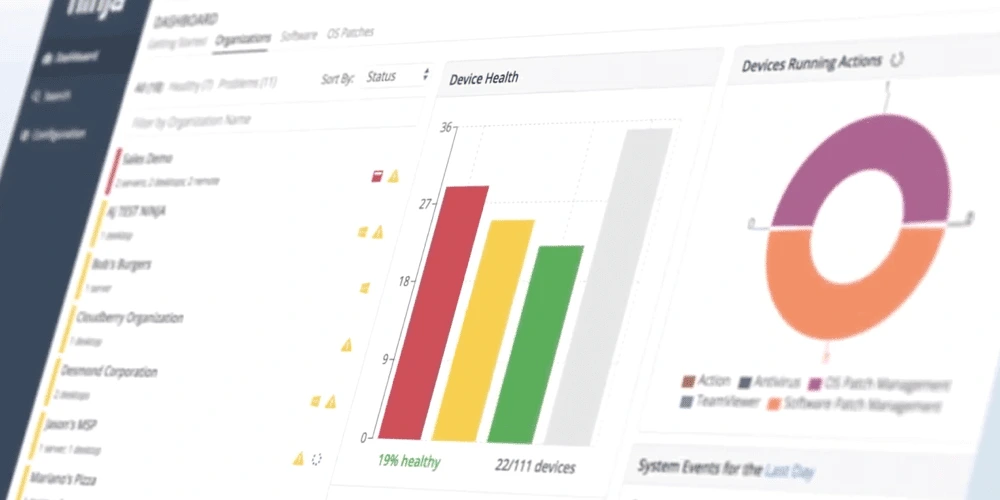
What is specifically included in our Managed Workplace?
The Managed Workplace is not a standalone tool, but an approach to IT management and network management: continuous measurement, preventing problems, rolling out updates in a controlled manner, and intervening quickly when necessary. Below you can see the main building blocks.
Monitoring
With continuous monitoring we track endpoints (PCs, laptops), servers, and critical components. Think of storage space, CPU/memory, availability, and monitoring crucial Windows services that keep your business processes running.
In case of deviations (e.g. a hard drive that is nearly full or a device showing signs of failure) we automatically send notifications to support@flybywire.eu. This way we can proactively follow up — often even before end users notice anything.
Important: this works in both traditional environments with a server domain and in modern cloud-first SMEs that primarily run on Microsoft 365 (Teams, SharePoint, OneDrive) and work with standalone devices. Endpoint management and security monitoring are also crucial.
Responses
If something does go wrong (e.g. the Print Spooler stops), we can solve many problems immediately with automation and scripts: self-healing. The result: fewer tickets, fewer interruptions and an IT environment that remains stable — even during busy times.
This way we avoid downtime and keep your employees productive, without the need for a large internal IT team.
Installation
New PC or server? Then we install the management agent so that the device is automatically included in our management. In many networks, this can also be (partially) automated, allowing onboarding to proceed quickly and consistently.
From that moment on, we have a complete inventory: operating system (Windows/Mac/Linux), RAM, disk size, warranty, installed software, network addresses and connections, and more. This data forms the basis for managed network management and rapid support.
For each client (and sometimes per type of device) we link the appropriate policies: what do we monitor, which updates are allowed, which scripts can run and which notifications are critical? For example, with 3CX VoIP installations on Windows we monitor the 3CX services and restart them automatically if necessary.
Patching
With patch management we keep systems secure and up-to-date. It’s not just about Windows Updates, but also updates for Microsoft applications and commonly used software from other vendors.
Outdated software is one of the most common causes of security incidents. One unpatched application can become an entry point for malware or ransomware. That’s why we treat updates as an essential part of cybersecurity and network security.
Think of tools like Adobe Reader, 7-Zip/WinZip, Notepad++, browsers and other standard applications. By automatically updating these, you reduce risks and avoid compatibility issues.
Night Shift
Many customers asked for a way to perform updates without disrupting the workday. Especially with larger updates, a restart during office hours can be frustrating and cost productivity.
That’s why we developed Night Shift: we perform patching and maintenance outside of office hours. Users shut down their PCs at the end of the day, we start devices (where possible) in the evening, install updates, restart if necessary, and then switch everything off again to save energy.
Servers, of course, continue to run. We schedule server updates carefully, and never during critical processes such as backups.
Backups always take priority: we avoid overlapping maintenance windows to ensure data integrity.
With Ready to Go, we can also automatically start devices just before the start of the workday. Employees log in and can start immediately — without waiting.

Integrations: security and backup as core components
Good network management does not stop at monitoring and updates. A modern SME also needs strong endpoint security and reliable backups — for servers, PCs and cloud platforms.
SentinelOne
Through integration, we can ensure that new devices automatically receive SentinelOne: powerful endpoint protection (EDR)that helps protect against viruses, malware and ransomware. This keeps your entire network consistently secure.
Cloud Backup
We can also manage cloud backup centrally from the same management environment. This makes follow-up simpler and allows – if desired – customers to perform restores themselves (with the right permissions and guidance).
We provide backups of servers and endpoints, but also of Microsoft 365: Outlook, OneDrive, SharePoint and Teams. Because backups can run multiple times a day and only capture changes, you have access to recent restore points — crucial after an incident or data loss.

Conclusion: one partner for network management, automation and peace of mind
For SMEs with 10 or more employees, the Managed Workplace is a logical step towards stable network management and automation. You get an IT environment that is monitored, updated and secured—without you or your team having to constantly 'step in'.
What does this concretely deliver?
- Fewer problems with PCs, laptops and servers thanks to proactive monitoring
- Fewer interventions needed due to automation (self-healing scripts and policy-based management)
- Higher uptime and productivity: less downtime = lower costs and less stress
- Fast remote support: solving problems without unnecessary travel
- Personal assistance on your own computer, with clear communication and follow-up
- Create users and roll out software faster without wasting time for your team
We turn your IT environment — from endpoints to servers and network hardware — into an up-to-date, secure and high-performing workplace. This way, you can focus on your core business, while we handle network management, patching, monitoring and automation.
Ready to have your network managed proactively?
Request a meeting with Fly By Wire and discover which quick wins (monitoring, patch management, Microsoft 365 backup, security) have the most impact in your SME.
FAQ (frequently asked questions)
No. Cloud-first environments with Microsoft 365 also need endpoint management, monitoring, patching and security.
Reactive management only starts when users report problems. Proactive management detects deviations early (monitoring) and prevents incidents through automation and controlled updates.
Not if you plan it smartly. With Night Shift, we carry out updates and restarts as much as possible outside office hours.
Microsoft 365 has built-in availability, but that is not the same as a complete backup strategy. Therefore, we provide separate Microsoft 365backups (Outlook, OneDrive, SharePoint, Teams) with restore points.
Yes. Good network management also includes visibility of connectivity, performance and stability of your network components, not just your PCs and servers.
No, we offer complete cyber security,VoIP phone systems and even fast internet connections and mobile phones for business.